 |
Focus™ |
|---|
Welcome
Welcome to Focus™!
Focus™ is a simple no-nonsense web app to manage your goals and the resulting roadmap, collaboratively tracking progress and results.
It is open-source, free and does not require a complicated setup of projects, views, boards and so on.
Just go ahead and start using it.
Click the ⇦ "Back" button in the upper-left corner or the  "Roadmap" button in the top-level menubar to start working on your goals and the resulting roadmap. "Roadmap" button in the top-level menubar to start working on your goals and the resulting roadmap.
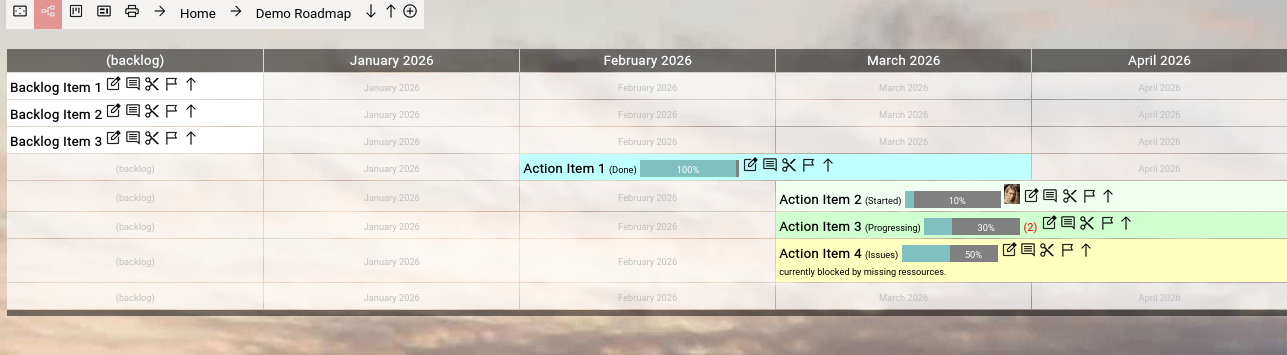
(Example: Focus™ roadmap view)
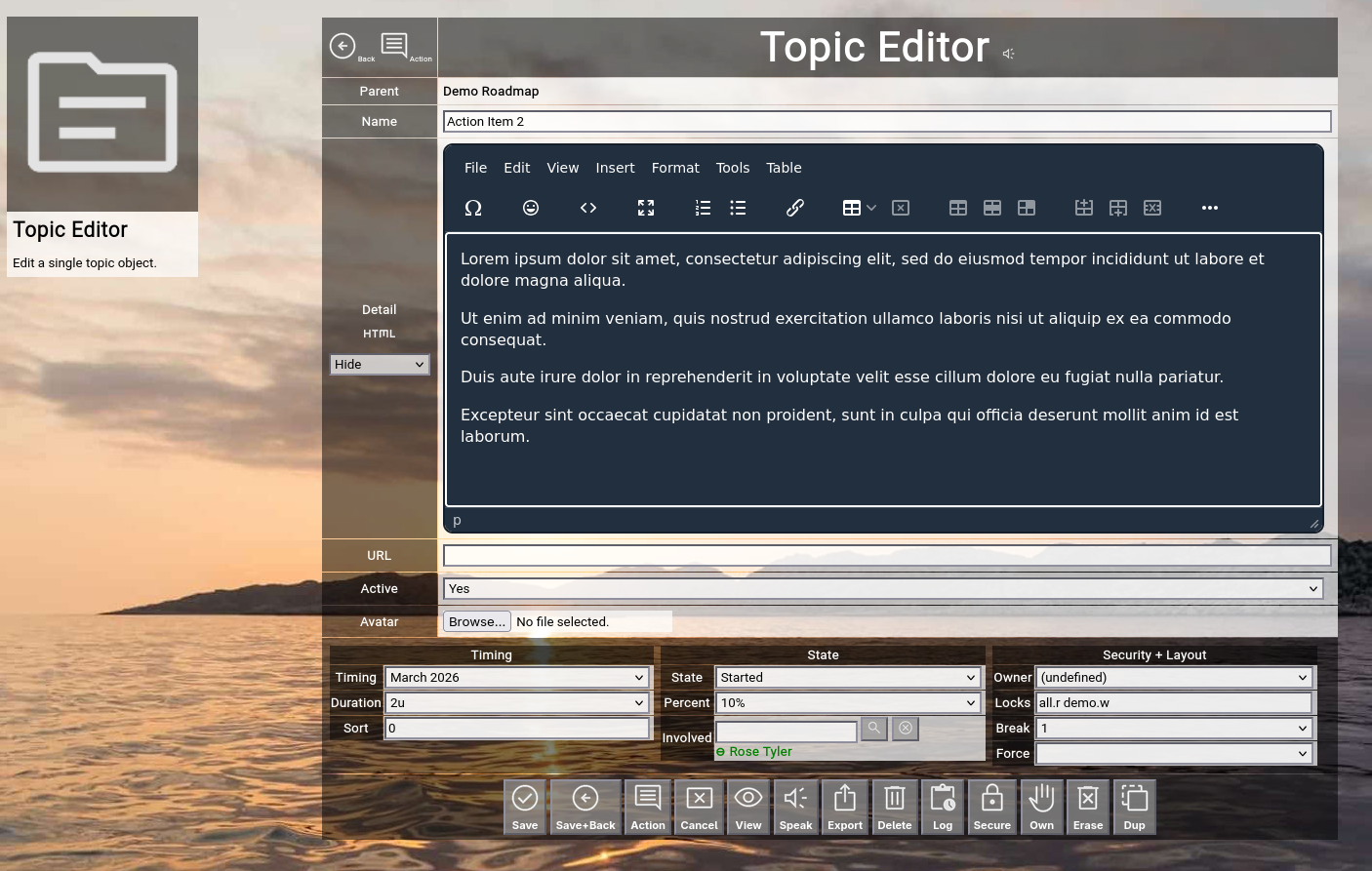
(Example: Focus™ topic editor)
Quick Introduction
User Account?
To work with Focus™, you need a user account.
If you already have one, either follow the personalized link in your notification mail or (if you do not have a notification mail yet), use the "Recover" option in the "Home" menu, enter your email address and click "Recover".
In a corporate email environment, it may take a couple of minutes until the email arrives, due to security and malware protection procedures (also have a look at your spam folder).
If you do not have an account yet, use the "Register" option in the "Home" menu to register a new one (the registration will need approval from the SysAdmin of your installation; afterwards you will receive a notification email as described above).
Focus™ does not use passwords; it issues 32-character personal secret certificates, which identify you and which are stored in your browser.
You can recover your certificate at any time with your email address and flip your certificate to a new random one as often as you like (if you think it is necessary for security reasons; use the "Recertify" option in the "Home" menu).
Topics
The main items you will create in Focus™ are so-called "topics".
They represent goals, concrete activities or anything else you can think off and are located on a timeline (usually measured in months).
The duration of a topic defines how many units (usually months) the topic spans on the timeline.
Topics also have a state (like "planned", "started" or "done") which also defines the color of the topic on the timeline.
You can estimate a completion percentage for a topic, which will be shown as a percentage bar on the timeline.
People can be involved with a topic to signal that they take responsibility to drive the topic forward.
A topic can have an optional attachment (called an "avatar"), which either serves as an icon on the roadmap or which can be any kind of document (for example a PDF).
You can also paste a link to somewhere else into the URL field of a topic (for example to a Jira ticket), which will be shown as a shortcut on the roadmap.
Topics use a simple access restriction feature called "locks + keys".
Users have a collection of keys; topics have a collection of locks which match the keys and qualify the access level.
For example: A couple of users have the itsm" key.
A couple of topics have the "itsm.w" lock.
This defines "write" access for all users who possess the "itsm" key.
The owner (=creator) of a topic always has full access to the topic.
Inaccessible items are effectively invisible to users.
The detailed description of a topic can be anything from one text sentence to a HTML-formatted document describing the topic in detail.
System Log
Any update in Focus™ (changing a topic name, setting a different state, etc.) will be automatically logged to the system log.
The system log of a topic can be viewed in the topic editor screen for audit purposes.
Actions
Every topic contains an action log.
Here you can add an action (described in a couple of free text sentences), if something significant happened in the context of the topic.
You can also add an attachment or add a link to somewhere else.
This works much like a "diary" for your topic; note down everything important happening in the context of your topic.
Roadmap View
New topics are directly created from the roadmap view.
A roadmap is simply a view on a focused topic (which defines the timeline range shown in the roadmap).
By default you focus on the "Home" topic, which usually spans the entire defined timeline (for example one full year).
New topics are therefore initially created below the "Home" topic, thus defining a hierarchy of topics.
You can now create a topic for example called "Company XYZ Roadmap 2026" here.
Then you click on the name in the roadmap view and the focus will switch to the "Company XYZ Roadmap 2026" topic.
When you now create another topic, the topic will be created below the "Company XYZ Roadmap 2026" topic.
This mechanism works with any topic and allows you to create "sub-roadmaps" on-the-fly when needed.
You just focus on an existing topic and start creating more topics below to define a task breakdown.
The "breadcrumb" on top of the screen allows you to easily navigate back.
MyRoadmap View
If you are involved in many topics all over different roadmaps, this view comes in handy.
It works exactly like the roadmap view, but it shows all the topics in which you are involved.
Your own consolidated personal roadmap!
And it can be viewed for other people, too.
Presentation Mode
Focus™ is also designed for presenting roadmaps to an audience easily.
The presentation mode removes all distractions and only shows the relevant information.
You navigate your roadmap with the help of the breadcrumb, no more no less.
Focus™ includes an experimental feature which uses the browsers speech synthesis capabilities to read aloud the details of a topic or an action.
This frees you of reading these during a presentation yourself (you can already think ahead while the browser is reading).
The print view allows you to print a formatted view of your roadmap (or parts of your roadmap) as a PDF file.
Such a file can be easily distributed to an audience of interest, which does not have direct access to Focus™.
It includes all the actions and functions like a snapshot of a roadmap diary.
This completes the quick introduction to Focus™.
Full documentation is available in the "Documentation" section of this application (have a look at the top-level menubar or the "Home" menu).
Below the Engine Hood
Focus™ is written in the Go™ language (~60 modules with a total of ~25.000 lines of code).
It uses an open-source MariaDB/MySQL database to store its data.
All components of Focus™ are available under open source licenses.
Due to its Go™ foundation, Focus™ can run on any operating system platform, which provides a Go™ compiler.
| 




 Welcome