Foreword
Focus™ started with the need to have a simple, dedicated and collaborative platform to manage goals within a company and derive an easy-to-handle flexible roadmap based on the goals to track and steer your progress in a management team.
Yes, we hear you scream: "Jira™?"
We have been there, done that.
And do not mistake this as an "anti-Jira™-rant"; we have introduced Jira™ to large scale product organizations with tickets on multiple flight levels.
We tried to build a flexible view in Jira™ over a weekend, which allows direct editing of a roadmap on a timeline with estimated completion percent bars, color status coding and easy nesting of tickets over multiple hierarchy levels on demand.
Drill capability into a ticket to provide easy task breakdown.
Not using exact dates but simple selectable month slots and duration.
Individual status codes without the limitation of a pre-defined workflow.
And simple ticket access security, which can be adjusted on-the-fly to new circumstances.
Guess what?
We did not make it with acceptable results.
We also had a short look at other available solutions like Microsoft Planner™; this one seriously lacked functionality and we quickly dropped the idea.
Here is a summary produced by the Google Gemini AI regarding Jira™ being overly complex:
Jira™ is widely regarded as a powerful tool for project management and issue tracking, but it is also frequently criticized for being complex, bloated, and difficult to use.
The sentiment that "Jira™ is a complicated mess" stems from its excessive, often unnecessary, configurability, which can lead to overwhelming interfaces and inefficient, convoluted workflows.
Why Jira™ is often considered a "Complicated Mess":
- Over-customization: Jira™’s greatest strength is also its weakness; it is highly customizable, which often leads to administrators creating overly complex workflows, unnecessary fields, and confusing issue types.
- Poor User Experience (UI/UX): The interface is often described as cluttered and non-intuitive, making it hard for users to find settings, create tickets, or track progress.
- Performance Issues: As projects grow, Jira™ can become slow and sluggish, with, in some cases, long load times.
- Steep Learning Curve: New users, especially non-technical teams, find it hard to get up to speed due to the sheer volume of features and settings.
- Confusing Hierarchy: The distinction between project-level settings and global settings can be confusing, making simple tasks hard to execute.
- "Everything is an Issue" Mentality: While flexible, this approach can make it difficult to distinguish between bugs, tasks, and stories, leading to a cluttered backlog.
As a summary, we found it too complex for the intended use case as it does not provide the straight-forward out-of-the-box features needed for our vision of an easily-usable collaborative high level goal and roadmap management.
That is why we decided to create our own tool which does exactly one thing: simple easy-to-learn and flexible management of goals and roadmaps on management level.
Have fun!
Trademarks
The following trademarks belong to Litehouse Tech Consulting and can be used under the Focus™ custom open source license (explained in a separate chapter of this documentation):
Focus™ (the goal and roadmap management app)
The open source web application to manage your goals and the resulting roadmap in a simple and collaborative way, written in the Go™ language.
ZML™
A simple HTML-like format without the DDT specification.
Used as an export and import format in Focus™.
What (the hell) is Focus™?
So enough explaining why our use case did not work with Jira™ ... lets have a quick introduction to Focus™!
Focus™ is designated as a super-simple web application to collaboratively manage your goals and the resulting roadmap with focus.
It is written in the modern Go™ language as a compact web service.
There is a single executable file which contains the SSL-capable web server and all required web services, which is started with a single command to listen on the web.
The only other component required is a MySQL/MariaDB SQL datasource to store the data in.
Focus™ is platform-independent, open-source and free-to-use.
Here is a list of important elements in Focus™:
Users
Users can self-register in Focus™ by entering their name, email address and short personal details (e.g. their job title and company).
A simple 3-fields 2-clicks process.
They need approval by an existing administrative user (to honor 4 eyes principle from a security perspective).
There are no passwords or complicated SSO configurations.
Focus™ creates a random non-memorizable personal secret certificate for every user, which can be retrieved by email and used to login (clicking a link in the email or copy-and-paste into the login screen).
A new random certificate can be created at any time on-the-fly without interrupting the current session (but at the same time invalidating all sessions on other devices in case a security incident is suspected).
Users have a collection of keys (for example "all", "itsm", etc.) which are automatically used to access information in Focus™.
Information to which the user has no matching keys, is simply invisible to the user.
Topics
Topics are the main carrier of information in Focus™.
A topic can be anything like a formulated goal, a concrete outcome, or a concrete task to reach the outcome.
Focus™ has no topic types to completely avoid the additional complexity and because they are not needed in the way how Focus™ approaches task breakdown.
Topics have a name and a detailed description as a minimum.
The detailed description can be anything from one plain text sentence up to an entire HTML-formatted document, which can be edited inline with the included HTML WYSIWYG editor.
Each topic can also have an optional attachment (called an "avatar"), because it can either be a JPG, PNG or GIF image automatically used as an icon or a full PDF document for later downloading and viewing.
Alternatively a topic can also include an URL to somewhere else (which can point to any other website, application or document associated with the topic).
Each topic can have a timing.
If no timing is set, the topic is considered to be part of the backlog.
Otherwise, the timing consists of (usually) a starting month and a duration (how many months it takes).
The timing positions the topic automatically on the roadmap.
Each topic can have a state.
A state is something like "Planned", "Started", "Progressing", "Issues" or "Done".
You can additionally set an estimated completion percentage, which will result in a percentage bar on the roadmap to easily communicate the progress of the topic.
And finally you can involve multiple users into the topic, who take responsibility to drive the topic forward.
As already touched in the "Users" section, a topic has a collection of locks, which need to match the keys of the user accessing them.
A lock is something like "all.r" or "itsm.w" (the single letter after the dot is the access level: r=read, a=add, w=write, s=super).
This governs what users can do with the topics (not seeing them at all, only able to view them or being able to edit them).
Every topic also has an owner (the original creator of the topic).
The owner always has full access to the topic.
And finally the most important fact:
Topics are always created inside of other topics.
There is a top-level topic called "Home" which usually contains topics representing roadmaps for different teams or cases.
To create topics inside of another topic does not require any configuration.
You just drill into a topic and start creating additional topics.
This allows a maximum level of flexibility.
If a topic grows more and more complex while executing, just drill into it and perform a task breakdown on-the-fly.
The drilled-into topic becomes a small roadmap itself!
You can even cut the now complex topic out of a roadmap and paste it to the top-level "Home" topic to promote it to its own roadmap!
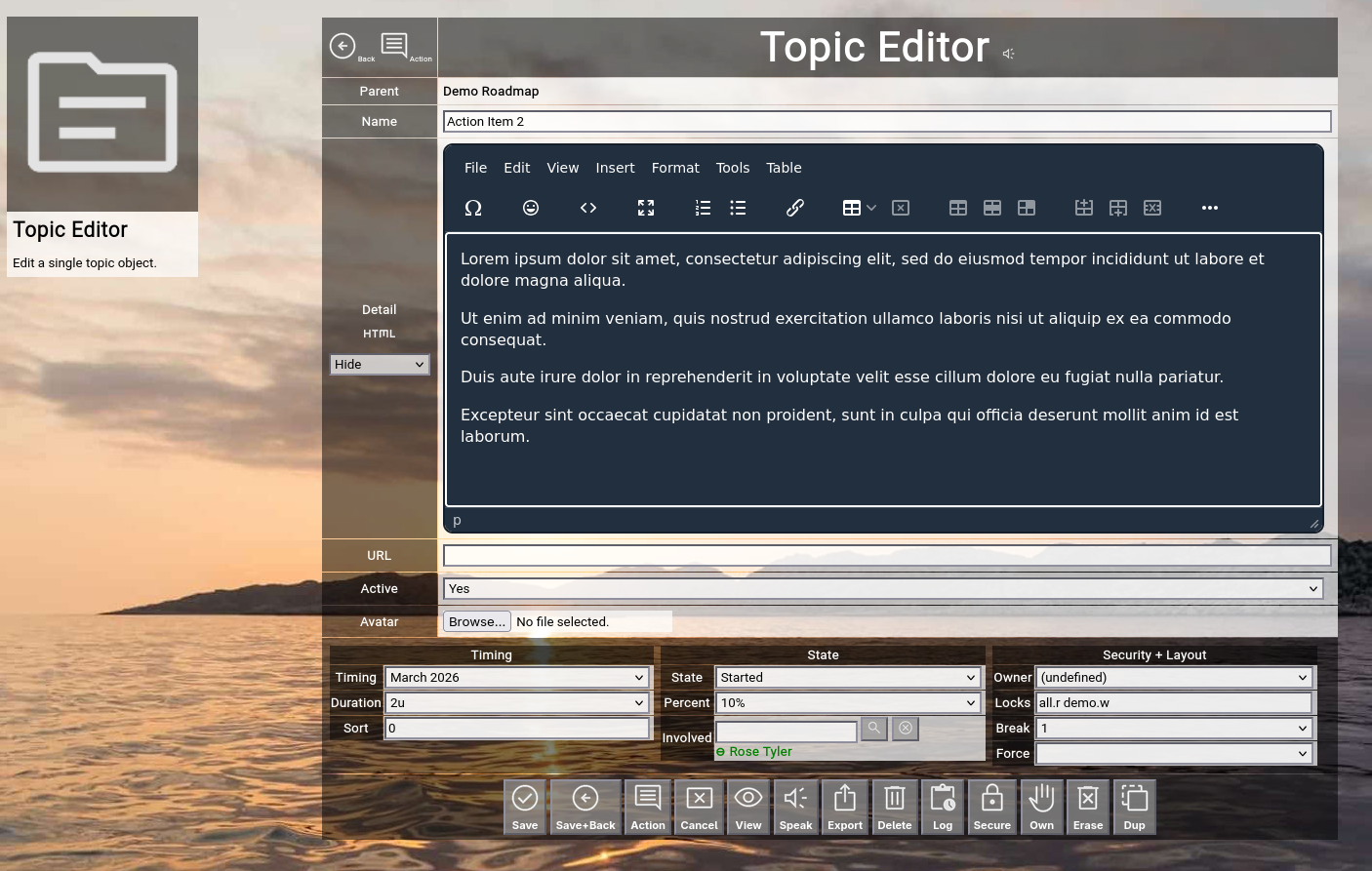
(Focus™ topic editor)
Timeline
The timeline is the 1st central configuration item of Focus™.
Here you decide in which cycles your teams think.
The typical best practice is to partition this in calendar months (which is the right granularity to track and manage on goal level).
But you can as easily specify calendar weeks or use "sprints" (2-week cycles).
One thing is important:
Establish one frame-of-reference for all your teams on the same flight level and do not manage with different granularity on the same flight level!
As time passes, you can easily add additional slots on the timeline and expire old slots on the timeline to keep things focused.
States
The states are the 2nd central configuration item of Focus™.
They establish a common frame of reference for all your topics, in which state some work can be.
A typical best practice used is the following:
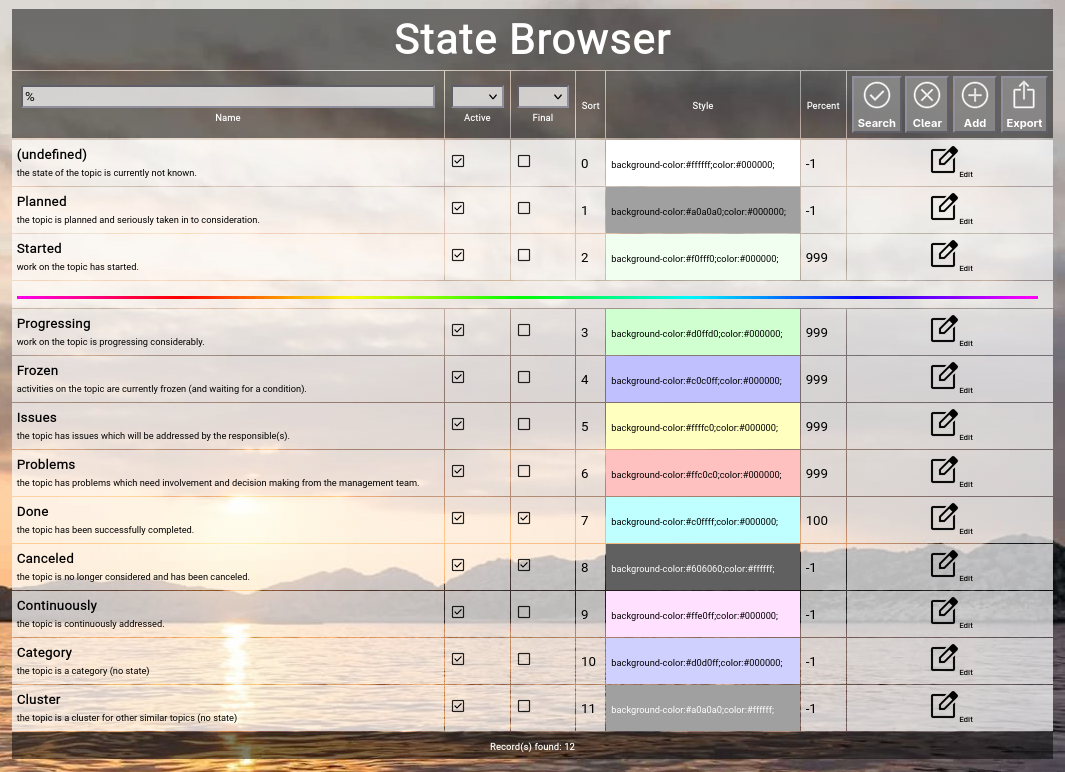
(Typical state best practice configuration in Focus™)
States have an order, some of them are final, some of them have associated percentage completion values and all of them have an associated color, which is used for the topic on the timeline.
Involvements
As already noted in the topic section, users can be involved with topics to signal contribution or responsibility for the completion of the topic.
Involvements can also be easily searched independent of a single topic.
This is for example helpful, if you want to list all topics with which a certain user is involved.
Actions
Actions are the 2nd carrier of information in Focus™.
Whenever you do something relevant in the context of a topic, you can add an action to the topic to document it.
An action is associated with you as a user and has a point-in-time which is also used to calculate an easy-to-understand age (for example "3 days ago").
As with topics, the action can be anything from one plain text sentence up to an entire HTML-formatted document, which can be edited inline with the included HTML WYSIWYG editor.
Each action can also have an optional attachment (called an "avatar"), because it can either be a JPG, PNG or GIF image automatically used as an icon or a full PDF document for later downloading and viewing.
Alternatively an action can also include an URL to somewhere else (which can point to any other website, application or document associated with the action).
Actions function as a kind of "diary" for the topic in which you can record every significant information, which helps others to understand what already happened in the context of the topic.
Actions can also be used to send a daily digest of all activity over all the topics by email (which functions as the "daily news").
Roadmap View
Finally, the roadmap view of Focus™ brings all the above together.
The view is always focusing on one topic, which provides the range for the displayed timeline, based on its timing and duration.
If you focus on a topic with the timing of "January 2026" and a duration of "12 units", your roadmap will start at January 2026 and will span 12 months.
All topics directly included in the focused topic are plotted on the timeline in sequence of timing and optional additional sort.
The state defines the color of the topic and additional information like percentage completion and more are displayed next to the topic.
You can drill into any topic or drill up again with the help of the "breadcrumb" (a list of all topics hierarchically above the currently focused topic).
Also you can open and close individual topics to show one more level of topics below (if any), or you can open or close all the topics below the currently focused one.
And finally you can cut multiple topics to your personal clipboard and paste them again somewhere else on the entire roadmap and at any level.
You can invoke the editor on existing topics or add new topics at any level.
Invoking the presentation mode removes all distractions (like buttons or the top-level menubar) from the display, so that other people who watch can easily grasp what is going on.
Settings allow an additional granular configuration of what is displayed and what not.
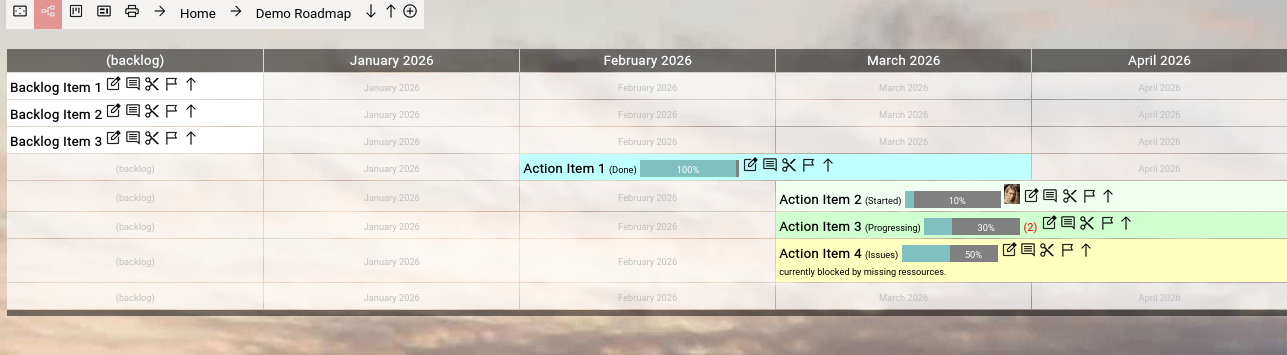
(Focus™ roadmap view)
Other Views
In addition to the classic Roadmap view described above, Focus™ also supports a Kanban view (topics grouped by status in separate columns) and a Context Chart view (topics hierarchically nested into topics, plotted vertically or horizontally).
These views can be switched dynamically during browsing or can be forced for a certain topic and all topics below to a certain view.
The additional views are considered "supportive"; the primary view remains the Roadmap view.
Both additional views provide the same browsing and editing features as the roadmap view.
MyRoadmap and MyKanban View
These two views consolidate all topics with which a user is involved into a single roadmap or a single Kanban board.
It can be invoked for the currently logged-in user, but also for other users to view their perspective.
Print View
The print view formats the Roadmap view or the MyRoadmap view for easy printing to a PDF document.
The resulting PDF document is independent of the Focus™ application and can be distributed to other people who do not have access to Focus™.
That completes the quick introduction to Focus™.
You can now either simply start exploring Focus™ by using it or you can have a look into the "Topics, Roadmaps, Actions Manual", which goes a level deeper on the mentioned functionalities.
| 





 Introduction